Open a saved popup draft. Use the chat for design and artwork changes. Targeting, integration delivery and publishing are configured in their own steps. Selecting a template without requesting changes does not need an AI conversation.
Back to help center
Templates & AI design
Edit a popup with AI
Write focused requests and check the actual design, fields and mobile result.
2 min read Reviewed Nov 10, 2026
01 Before you start
02 Follow these steps
- Select the screen in Popup flow that you want to edit. The next request uses that screen as context. Choose whole-popup scope where available when the task needs multiple screens.
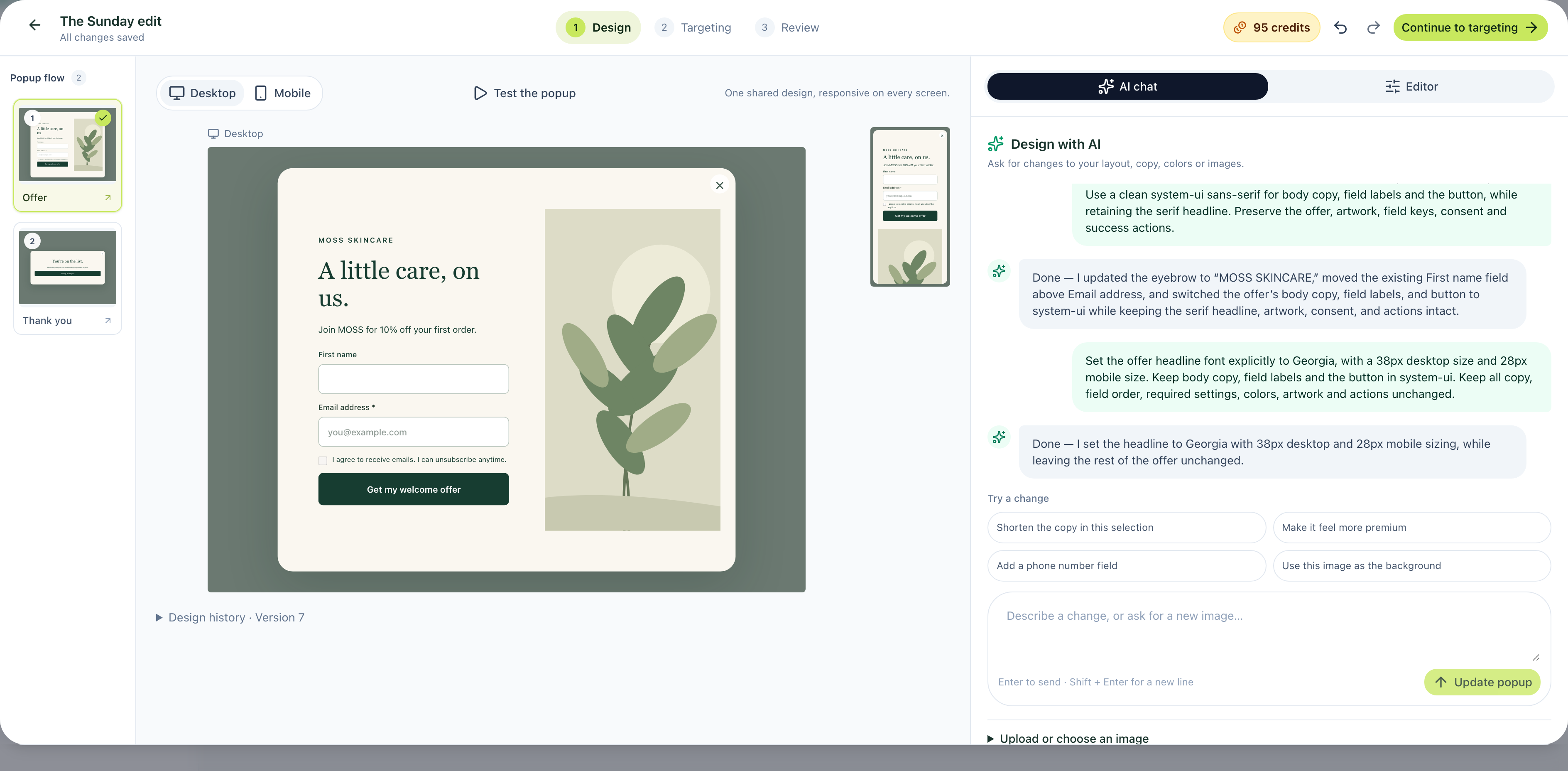
- State one change and what to preserve: “Add an optional First name field above Email address. Keep the email required, artwork, consent and submit action.”
- Choose Update popup and wait for the result before sending another request.
- Inspect the real preview. Check text, field order and required flags; a chat response alone does not prove the edit is correct.
- If the field lands in the wrong position, request a correction to the existing field instead of creating a duplicate. Use Undo when appropriate.
- Switch between desktop and mobile, then test every form step and confirmation.
03 If something is different
For a precise brand request, provide the actual colors, text and image direction. AI artwork is not a verified photograph of your product. A prompt mentioning exit intent or sending email does not configure those actions. For failures, check credits and access; for practical prompts, read the tested AI examples. Recheck the latest design before publishing.
04 A real editing example
Was this article helpful?
Related articles
Use a template: keep its design or customize with AI
Understand the two template choices and what happens after sign-in.
Read article
Launch your first Onvocado popup
Choose a template, review it, set targeting and verify a real signup.
Read article
Install Onvocado on your website
Copy the correct website snippet, check installation reports and test a published popup.
Read article
Didn't find what you need?
Our team is one message away. Expect a reply within a business day.
Contact support