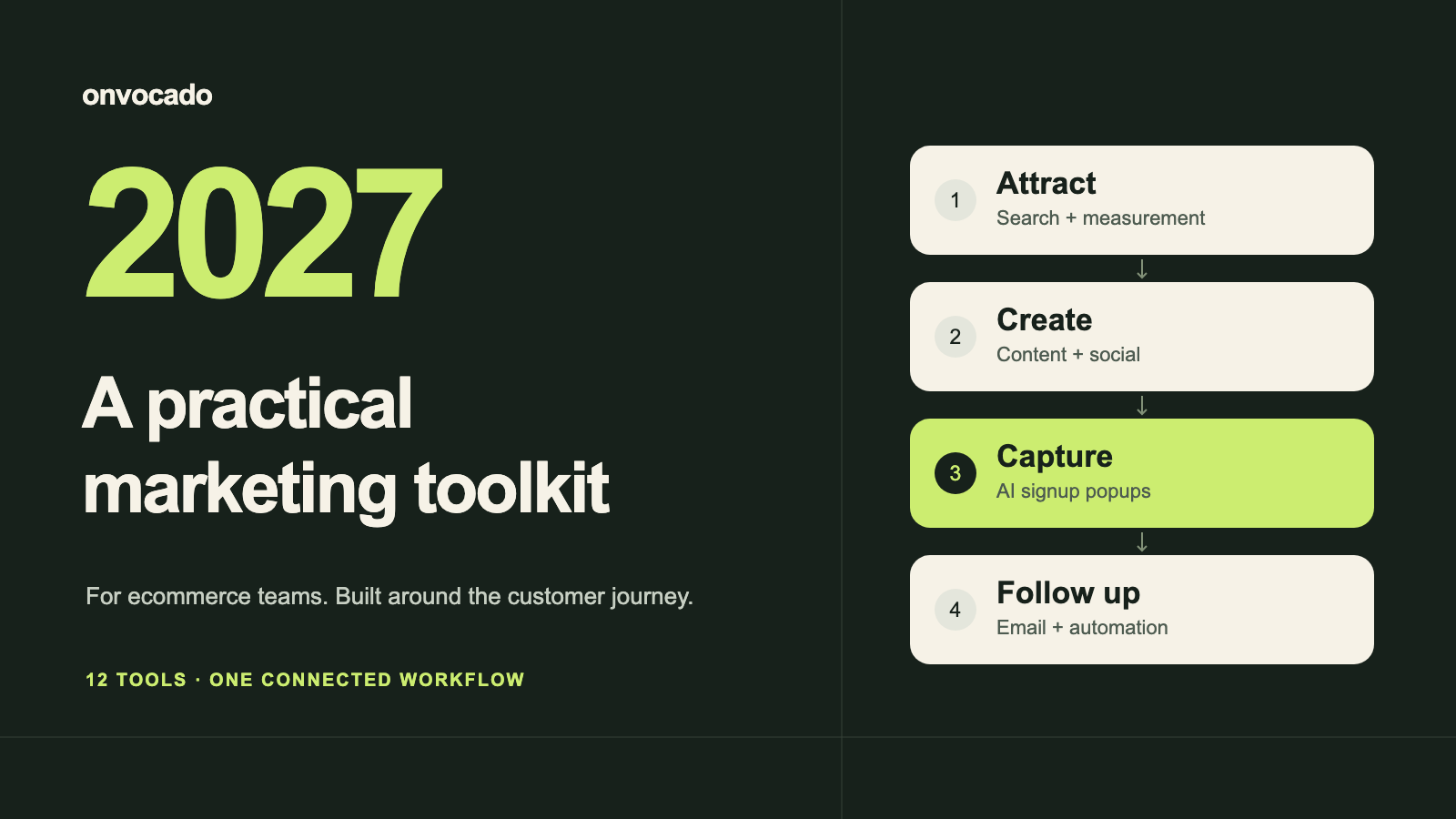
The best digital marketing tools for an ecommerce team should answer four questions: how do people find you, what helps them decide, how do you earn permission to stay in touch, and which activity produces orders?
For a lean starting stack, use Google Search Console, Google Analytics 4, Canva and one email platform. Add a popup builder when onsite signup is a priority, a social scheduler when publishing becomes repetitive, and paid research or automation when you have a clear job for it.
This guide compares 12 options by that job. Omnisend, Brevo and Klaviyo are alternatives for different situations; most stores do not need all three. HubSpot is a separate consideration when sales follow-up and CRM matter.
2027 planning edition · updated October 27, 2026. We reviewed current vendor documentation and plan pages. This is a selection guide, not a hands-on benchmark of every product or a prediction of 2027 prices. The Onvocado example uses our actual builder walkthrough. Onvocado publishes this guide and is included in its own category.
The best digital marketing tools at a glance
Start with the task you need to improve. Free plans have limits; paid prices can depend on billing term, region, contacts, channels, seats or usage. The source links in each entry explain the current basis.
| Tool | Choose it for | Entry point | Main tradeoff |
|---|---|---|---|
| Google Search Console | Your own Google search visibility | Free service | No competitor keyword database |
| Google Analytics 4 | Website and ecommerce measurement | Standard product is free | Useful reporting needs correct events |
| Microsoft Clarity | Understanding on-page friction | Free | Recordings explain behavior, not intent |
| Semrush | Keyword and competitor research | Limited free access; paid plans | Estimates and quotas need interpretation |
| Canva | Campaign graphics and reusable designs | Free and paid plans | Premium assets and AI limits vary |
| Buffer | A manageable social publishing schedule | Free: 3 channels, 10 queued posts each | Paid cost grows with channels |
| Omnisend | Ecommerce email and SMS workflows | Free: 500 emails/month, 250 contacts | Sending and contact limits matter |
| Brevo | Email campaigns and transactional messaging | Free: 300 emails/day | A daily cap can constrain a launch |
| Klaviyo | Customer-data-led lifecycle campaigns | Free: 250 active profiles, 500 emails/month | List growth changes the budget |
| HubSpot | CRM-led marketing and sales follow-up | Free tools; paid Marketing Hub tiers | Advanced needs change the total cost |
| Onvocado | AI-assisted website signup popups | Free Basic; paid plans | Follow-up email needs a separate platform |
| Zapier | Connecting repetitive tasks across apps | Free: 100 tasks/month, two-step Zaps | Extra actions increase usage |
Search and measurement: find the next useful action
1. Google Search Console: Find opportunities in pages you already have
Best fit: every store that wants to understand its own Google search presence. Search Console reports search queries, impressions, clicks and indexing issues.
Start with a useful question: which relevant page is appearing often but earning few clicks? Check whether its title matches the searcher's task and whether the content deserves the visit. Compare periods before rewriting an entire category.
Tradeoff: visibility is not revenue. This is a view of your site in Google, so combine it with website and order data rather than treating impressions as visits. Cost: free. Official details and current plans.
2. Google Analytics 4: Connect acquisition with meaningful website events
Best fit: teams that need a shared view of traffic and website activity. The standard Google Analytics product is available without a subscription charge.
Agree on a small event plan before building dashboards: a completed signup, a product view and a purchase are different actions. Use consistent campaign tags for links in email and social posts, then inspect the whole path rather than celebrating a spike in sessions.
Tradeoff: installation alone does not establish ecommerce measurement. Verify your store's events using Google's ecommerce setup guidance; consent, configuration and attribution affect what you see. Official details and current plans.
3. Microsoft Clarity: See where the experience breaks down
Best fit: a store with visits but unclear usability problems. Clarity provides free heatmaps and session recordings.
Use it to investigate a specific question: can mobile visitors find the close button, read the offer and complete the form? Review several relevant sessions, group repeated problems and change one thing you can evaluate. A recording is evidence of an interaction, not proof of why someone abandoned a cart.
Tradeoff: configure recording carefully around customer information. Review Microsoft's masking settings and your consent setup before collecting sessions. Cost: free. Official details and current plans.
4. Semrush: Research topics beyond your existing search traffic
Best fit: a team that can turn keyword and competitor research into a publishing or technical backlog. Semrush includes keyword research, competitor analysis, position tracking and site audits, with limited free access and paid subscriptions.
Research buying situations as well as product names: a skincare store might investigate routines for travel, gift sets and product comparisons. Inspect the actual results before deciding whether a topic needs a product page, category or helpful article.
Tradeoff: third-party volume and traffic figures are estimates, not your analytics. Compare quotas and the selected toolkit on the pricing page; an annually billed monthly equivalent is not a month-to-month commitment. Official details and current plans.
Content and social: create a repeatable publishing process
5. Canva: Keep campaign visuals consistent
Best fit: a small team producing social graphics, email artwork and campaign assets without a designer on every task. Canva offers free and paid design plans; premium content, brand tools and AI allowances differ by tier.
Create a small reusable kit: two layouts, a readable type scale, product photos and a clear offer area. Adapt a useful idea to each format instead of filling every channel with the same cropped image.
Tradeoff: a template does not supply product accuracy or a distinctive point of view. Check asset rights and review AI-generated copy and images. Cost: compare the actual seats, billing period and AI allowance you need. Official details and current plans.
6. Buffer: Publish reliably on the channels you can maintain
Best fit: a team whose bottleneck is scheduling and maintaining a useful social presence. Buffer's free tier supports three channels and ten scheduled posts per channel; paid plans are priced by channel.
Choose one or two networks your customers already use. Build a weekly mix of demonstrations, buying advice and customer questions, and reserve time to respond after publishing. Scheduling is useful when it supports that routine.
Tradeoff: connecting more accounts creates both subscription cost and editorial work. Estimate the number of channels and approval needs before choosing a paid tier. A scheduler cannot establish product demand for you. Official details and current plans.
Email and CRM: choose one home for follow-up
7. Omnisend: Start with store-oriented lifecycle messages
Best fit: ecommerce teams prioritizing email and SMS automation around a connected store. Omnisend's free plan allows 500 emails per month to up to 250 contacts.
Evaluate it with one real welcome journey: submit a test signup, confirm the intended audience and check the message that arrives. Add cart or post-purchase journeys only after checking the relevant store events and permissions.
Tradeoff: count sends as well as contacts. A multi-message sequence consumes more of the allowance than one newsletter. Budget paid contact tiers and SMS separately; a free plan is a small-scale starting point. Official details and current plans.
8. Brevo: Plan around sending volume and timing
Best fit: a team comparing email campaigns and transactional messaging in one service. Brevo's free tier includes 300 email sends per day, with a daily rather than monthly allowance.
That distinction matters for launches. If you want an offer to reach a list at one time, assess the daily cap and the paid plan that supports your intended schedule. Compare the whole workflow, including forms, follow-up and reporting.
Tradeoff: a large stored list is not the same as permission or capacity to email everyone immediately. Check automation and branding limits as well as headline sending volume. Official details and current plans.
9. Klaviyo: Make customer events useful for lifecycle marketing
Best fit: a growing store ready to maintain segmentation and behavior-based follow-up. Klaviyo's free tier allows up to 250 active profiles and 500 monthly email sends.
Before migrating, define three useful audiences, the events they depend on and who owns each journey. Test whether the data actually arrives with the right meaning. Sophisticated segmentation is only useful when someone maintains it and uses the results.
Tradeoff: growth in active profiles and channel usage changes the budget. Compare pricing at your current list size and a realistic next-stage size, with time for implementation included. Official details and current plans.
10. HubSpot: Give sales-assisted journeys a shared record
Best fit: teams handling wholesale enquiries, consultations or other sales-assisted purchases. HubSpot combines CRM-oriented marketing tools with paid Marketing Hub tiers, alongside free tools.
A retailer selling direct to consumers may first need an email platform. A business managing distributor enquiries may need contact ownership, qualification and a clear handoff to sales. Choose around that process rather than the size of the feature list.
Tradeoff: the free entry point is not a quote for an advanced deployment. Model the needed tier, contacts, seats and any onboarding before consolidating your stack. Official details and current plans.
Onsite signup: turn a relevant visit into a next step
11. Onvocado: Build and refine a signup popup with AI
Best fit: ecommerce teams that want to shape an onsite offer through prompts and visual review. In Onvocado, start from a template and refine copy, design and fields with AI while checking the result.
Our recorded AI popup walkthrough follows a MOSS skincare example through actual edits, desktop and mobile previews, a test signup and targeting review. It also shows why a follow-up instruction and a form check belong in the process.
Tradeoff: a popup is one step in the journey. Set up the promised discount and follow-up in your store or email platform, then test delivery. Cost: a free Basic plan and paid options; check current limits on Onvocado's pricing page. This is our product.
Automation: connect a workflow after it works manually
12. Zapier: Remove a proven repetitive handoff
Best fit: teams copying data between supported apps after every campaign. Zapier's free tier includes 100 tasks per month and two-step Zaps; paid plans expand the available workflow.
Map one handoff first: what starts it, which fields move, what happens to a duplicate and who sees a failure? Test with controlled records before relying on it. Prefer a working direct integration when it already meets the need.
Tradeoff: calculate the actions per record, not just the number of records. More steps, premium apps or a growing volume can change the required plan. Do not assume every app pair supports the exact fields you need. Official details and current plans.
Two practical ecommerce marketing stacks
A lean stack for a small store
Start with Search Console + GA4 + Canva + one email platform. Choose Omnisend for a store-centered starting point, Brevo when its sending model fits your schedule, or Klaviyo when the customer-data workflow justifies it. Compare them; do not install all three by default.
Add Onvocado if growing a permission-based list on your website is the next priority. Add Buffer if keeping a publishing schedule is taking too much time. Clarity can help investigate a known usability question. You can evaluate much of this with free entry plans, but contact and sending limits mean it is not an unlimited free stack.
A stack for a growing marketing team
Keep the measurement foundation. Add Semrush when someone owns search research and implementation; choose the paid email tier that fits your real list and journeys. Use Canva and Buffer at the collaboration levels you actually need.
Add HubSpot when a sales process needs a CRM, and Zapier for a tested gap between systems. Keep each tool's owner and monthly purpose visible. Remove a subscription when it duplicates a job or produces no actionable work.
A real AI popup example, and the complete workflow to test
Consider an illustrative skincare store publishing a useful travel-routine article. The tools become more useful when they support one coherent journey:
- Find a relevant question. Use Search Console for existing demand and Semrush when you need broader research. Write advice that genuinely helps someone choose.
- Create and distribute. Prepare campaign assets in Canva. Publish selected social posts through Buffer, using consistent campaign tags.
- Offer a relevant next step. Build a welcome-offer popup in Onvocado, with an accurate promise, a clear close control and the necessary fields. Check it on mobile and configure where and when it should appear.
- Verify the handoff. Using your configured integration or export/import process, submit a controlled signup and confirm that it reaches the intended audience in your chosen email platform with the right consent status. Confirm the promised message and discount work. A successful popup submission alone does not prove delivery.
- Measure and improve. Verify website events in GA4 and compare them with your store's order records. Use Clarity for a specific usability question. Improve one weak step before buying another tool.
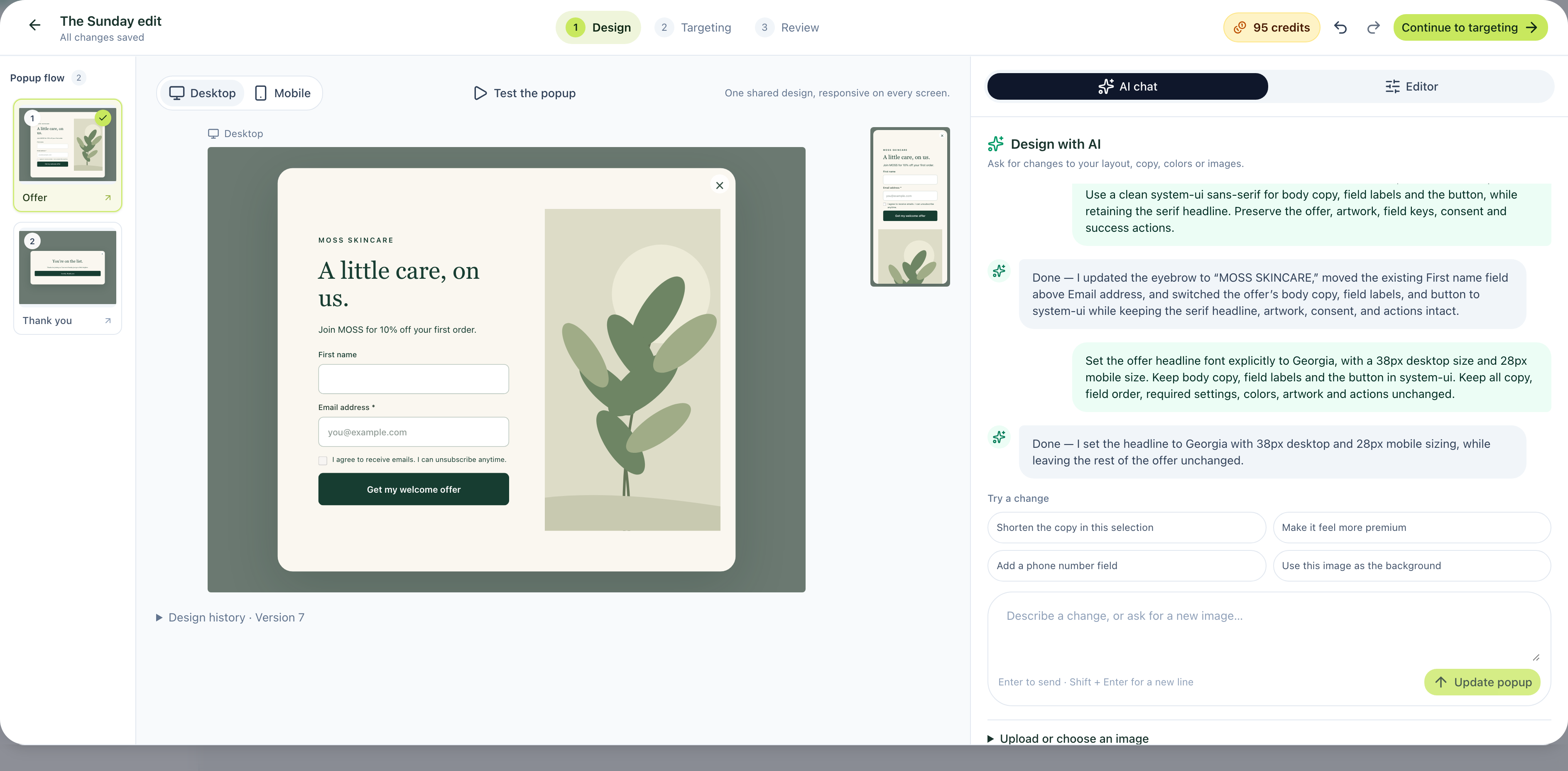
See the full screenshot and video tutorial for the demonstrated builder steps. The cross-tool journey above is a testing plan, not a claim that we benchmarked this entire stack.
How to choose without overbuilding your stack
- Name the bottleneck. More qualified visits, more completed signups and better follow-up require different changes.
- Price your real workload. Estimate contacts, sends, channels, seats and automated actions. Include setup and maintenance time.
- Check the connection. Verify your store platform, required data fields and events before choosing an integration.
- Set one success measure. Use completed and confirmed signups, useful enquiries or orders alongside traffic. Define the denominator and time window.
- Give someone ownership. An automation or report without an owner becomes another thing to maintain.
If your main obstacle is creating the offer itself, begin with the AI popup tutorial. If you are comparing campaign changes, read our A/B testing guide before drawing conclusions from a small sample.
Frequently asked questions
What are the best free digital marketing tools for a small ecommerce store?
Start with Search Console for search visibility, standard GA4 for measurement and Canva's free plan for design. Choose one email platform whose sending limits fit your needs. Clarity and Buffer's free tier can support specific behavior-research and scheduling tasks. Free access still takes time to configure and maintain.
Do I need both a popup builder and an email platform?
You need a reliable way to collect a signup and follow up. Your email platform's own form may be enough. Consider a dedicated builder when the design, AI editing or onsite campaign workflow is the part you want to improve. Test the entire handoff before publishing.
Can AI replace this marketing stack?
AI can help draft, design and refine campaign work. It does not by itself verify an offer, configure store events, record the right consent or deliver a promised message. Evaluate the completed customer experience, including the parts outside the AI editor.
Are these confirmed 2027 prices and features?
No. This is a planning guide for 2027, based on official information checked on October 27, 2026. Follow the linked source for current terms before subscribing. We will review this edition again in January 2027.