A free popup maker should let you publish a useful campaign within a clear allowance. A free account, a short trial and a paid plan with a refund guarantee are different offers. Start by checking which one you are getting.
This comparison covers three published free plans, an AI popup workflow in Onvocado, and two paid alternatives often included in free-tool lists. Choose around your website traffic, campaign and email destination.
Reviewed on 31 October 2026 by the Onvocado team. Competitor limits below come from their linked pricing pages; the Onvocado example has a recorded builder walkthrough. This is a documentation comparison, not a speed or conversion benchmark.
Free popup makers: compare the actual limits
Scroll horizontally to compare all columns.
| Popup maker | Monthly allowance | Sites and campaigns | What to check |
|---|---|---|---|
| Popupsmart | 5,000 pageviews | 1 website; 1 live popup | Includes a separate 100-email quota |
| Poptin | 1,000 visitors | 1 domain; unlimited poptins | Check the selected popup-only or email bundle |
| Claspo | 3,000 pageviews | 1 website; unlimited widgets | Free widgets carry a Claspo badge |
These are different usage units, so the largest number is not automatically the largest usable allowance. Confirm current terms with the provider before installing.
Which free popup builder fits your website?
Popupsmart: one campaign on a small site
A sensible shortlist option if you want to run one welcome offer or newsletter popup. Check whether one live campaign covers your needs before designing separate offers for several pages.
Poptin: several designs within a visitor allowance
Consider this option when you want to build multiple campaigns for a small audience. Check the email destination and the selected package before relying on email sending or removing branding.
Claspo: several widgets with visible provider branding
Consider this option if a provider badge is acceptable and you want multiple widgets. Its published free plan includes all features; compare the traffic ceiling with your actual pageviews.
Pageviews, visitors and popup displays are different
Imagine 500 people each opening four pages: that is 2,000 pageviews. If a popup appears once for each person, that is 500 popup displays. None of these numbers tells you how many people submitted a form.
This is an illustration, not a forecast or a universal billing rule. Providers define their own counting windows and behavior. Check:
- Whether all pages with the script count, including pages without a visible popup.
- Whether limits apply across all campaigns and websites.
- What happens when you reach the allowance: paused campaigns, an upgrade or another restriction.
- Whether email sends, stored contacts and AI generations have separate quotas.
Onvocado: create and refine a popup with AI
If your priority is turning a campaign brief into an editable design, Onvocado’s AI popup builder offers a different workflow. Describe the offer, brand, fields and mobile layout, then refine the draft in conversation.
For example, our MOSS skincare walkthrough starts with this brief:
Create a calm welcome offer for MOSS, a botanical skincare shop. Use an ivory background (#FAF7F0), deep forest green (#173D31), a warm serif headline and sage accents. Headline: “A little care, on us.” Body: “Join MOSS for 10% off your first order.” Button: “Get my welcome offer”. Keep one required email field, the existing consent choice and botanical artwork. Keep the whole form readable on desktop and mobile.
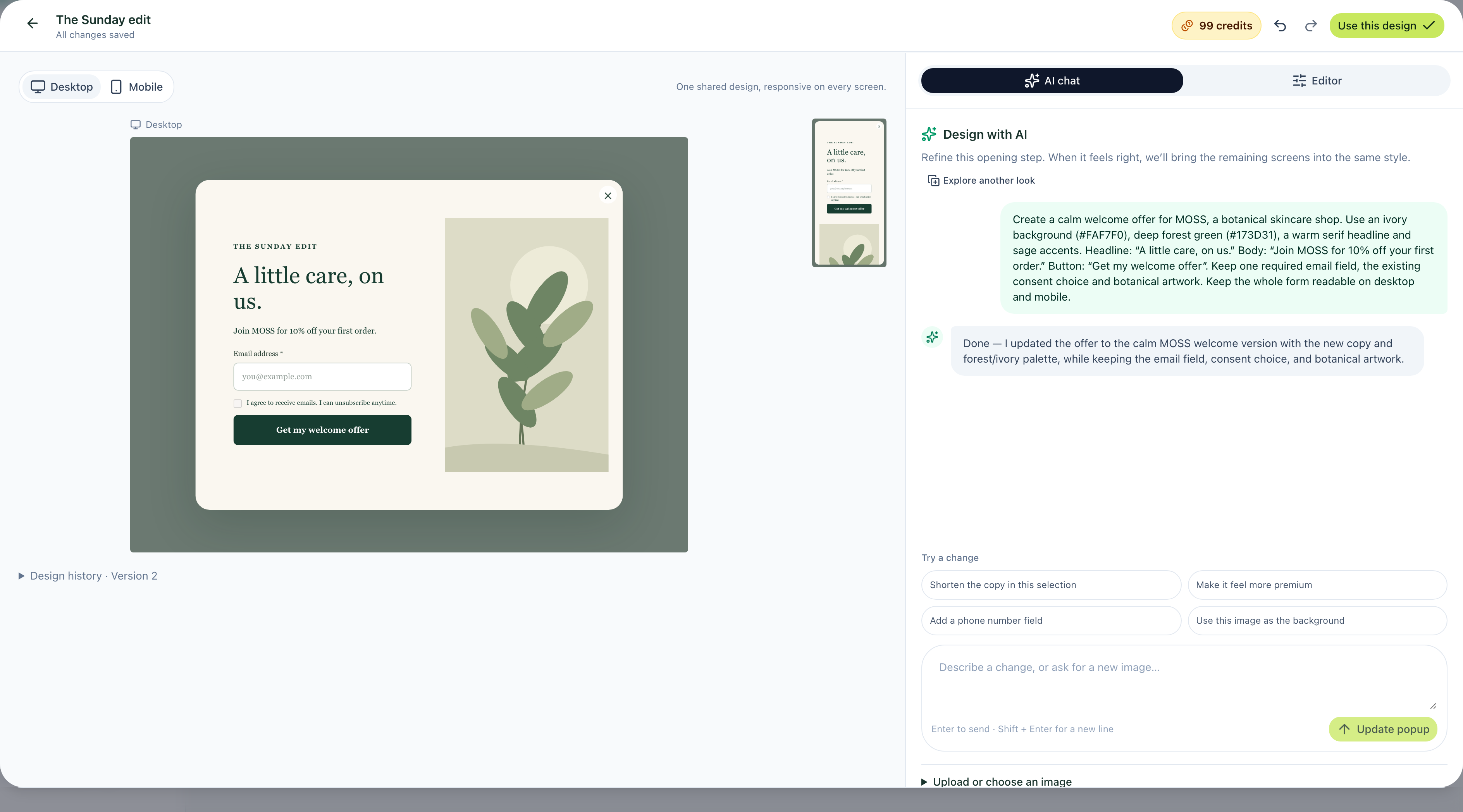
The step-by-step AI popup tutorial shows the full original prompt, screenshots, follow-up edits and video. For more starting points, see eight AI popup examples and prompts.
AI access does not imply unlimited free generations or publishing. Check the current access and usage allowance in your account before choosing a tool. Create an Onvocado account to review the workflow and your available allowance.
Paid alternatives: OptinMonster and BDOW
OptinMonster: paid plans with a refund guarantee
OptinMonster’s published plans are paid and include a 14-day money-back guarantee. That is not an ongoing free plan. Compare the total charged, renewal price and the tier needed for your targeting rules.
BDOW, formerly Sumo: confirm the current offer
BDOW’s current Pro offer advertises a 14-day trial with a card required. Some navigation still mentions free access, so confirm the available plan and what happens after the trial before assuming continued free use.
Test a popup maker before you commit
- Use the same brief. Build one real newsletter signup or welcome offer in each shortlisted tool.
- Check mobile. Make sure the close control, form and consent text remain usable without hiding the page’s main content.
- Choose a useful trigger. A click, a relevant page or enough time to read can be more appropriate than an immediate interruption. See our non-intrusive popup guide.
- Verify lead delivery. Submit a test email and confirm the destination list, consent and follow-up behavior. A success message alone does not prove that the integration worked.
- Measure completed signups. Review popup displays and actual submissions together. For longer forms, compare a multi-step popup workflow.
Check page performance with your own campaign installed. We have not run a controlled speed comparison between these tools and do not claim that one is a fixed multiple faster.
Questions about free popup tools
Can I publish a popup for free?
Yes. The three free plans listed above offer publishing within their limits. Check the traffic metric, branding, integrations and any separate email quota.
What is the easiest popup builder to use?
Test a complete task rather than just the editor: design, mobile preview, targeting and a working signup. A template may be enough for one offer; AI can help when you want to describe and revise a more specific design.
Can popups affect SEO?
Google advises against intrusive interstitials that obstruct access to content. Plan placement and timing around that guidance; a particular builder does not guarantee an SEO-safe implementation. Read Google’s interstitial guidance.
Where should I start?
Shortlist a tool whose allowance fits your traffic, then build and test one campaign. To try a prompt-led workflow, follow our AI popup creation guide before expanding to more offers.